
AI Automation Starter Kit
You know AI could help. Here’s where to start.
Learn how AI actually works in plain English, find the work worth automating in your business, and leave with a clear plan. No engineering background needed.
$99 one-time · Self-paced · 30-day refund
12 modulesA guided learning path
About 2.5 hoursOf focused instruction
About 1 hourApplied to your business
Self-guidedLearn at your own pace
Sound familiar?
You are not behind. You just need a clear place to start.
You keep hearing AI can help your business, but no one has explained what it is.
You have tried a chatbot, but you still do not know what is worth automating.
You worry about paying for the wrong tool, or pasting client data where it does not belong.
Before you automate anything, start here.
A look inside the Starter Kit: who it is for, how you will work through it, and the plan you will create for your business.
What you leave with.
Three working documents, built from your own recurring work and saved as you go. Together they become a plan you can carry out yourself or hand to someone who builds it.

Automation Opportunity Inventory
Three concrete automation candidates from your own week, each described as a process before a solution.
Workflow Blueprint
Your chosen project mapped out: what starts it, the inputs, fixed rules, AI steps, outputs, approvals, and what happens when something goes wrong.
Automation Action Plan
Your implementation path, risks, tests, and fallback, plus a project handoff brief you can build from yourself or give to an employee, freelancer, or developer.
Walk away with a plan, not another AI tab.
$99 one-time · Self-paced · 30-day refund
Start with a task you know too well.
The best first project is often hiding in your normal workweek. Explore a few examples of how a recurring task could become a more reliable workflow.
Every new inquiry means reading the same details, copying them into your CRM, and writing another follow-up.
- The trigger
A new inquiry arrives
- The preparation
Extract the key details and prepare a reply
- The human decision
Check the fit and approve the message
- The result
Send the response and record the next step
AI can prepare the response. You decide what gets sent, especially when pricing or promises are involved.
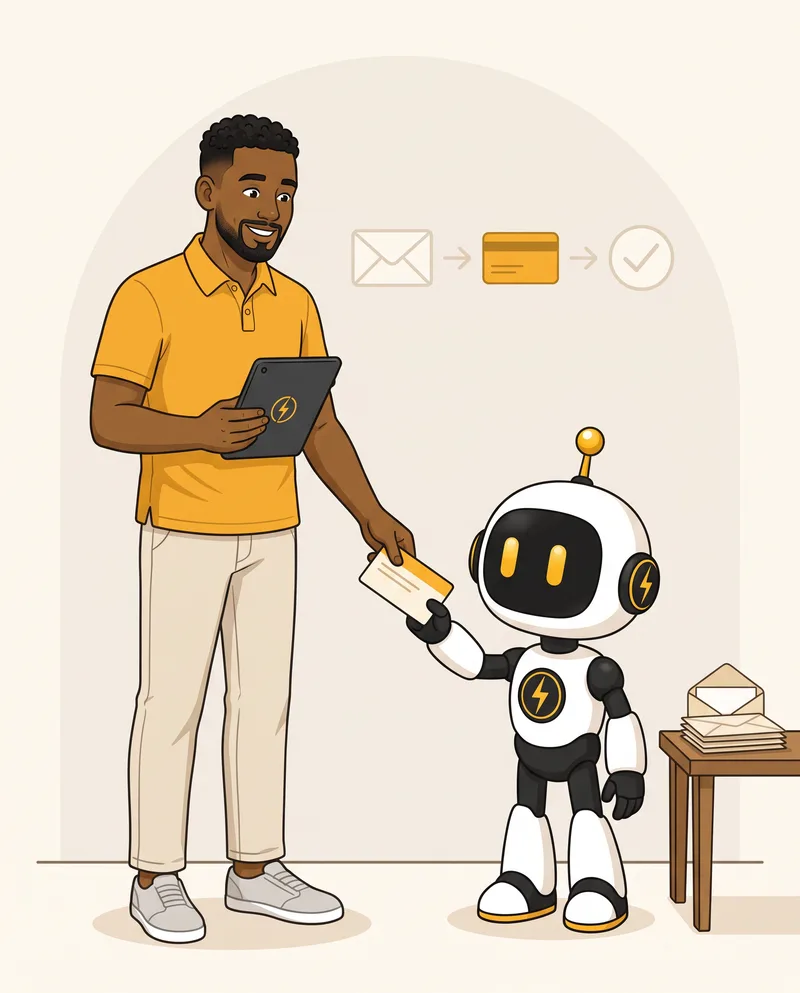
Illustrative example. In the course you design a plan like this for your own work.
Inside the course
Twelve modules from curious to a clear plan.
Short lessons, written references, and practice on your own work. Each module builds on the last.
What Is AI?
A plain-English foundation for better decisions.
Where Is AI and How Do You Actually Use It?
Match the tool to the task and start simply.
When to Use AI — and When Not To
Label each step of a workflow: AI, rules, or a person.
AI Safety & Responsible Use
Run the data quick check before you paste anything in.
Using AI Effectively — Prompt and Context Engineering
Turn a weak prompt into a strong one.
Identify Business Opportunities to Automate
Save three automation opportunities.
Prioritize Projects With the Most Significant Impact
Select one eligible first project.
Understand Business Automation Platforms
Sketch the automation stack for your project.
Understand AI Agents
Give an agent only the access it needs.
Design an AI Workflow
Save your Workflow Blueprint.
Testing, Error Handling & Monitoring
Save your risks, tests, and fallback.
Decide How to Implement the Project
Finish your Automation Action Plan and handoff brief.
12 modules. One clear plan for your business.
$99 one-time · Self-paced · 30-day refund
Who this is for.
You do not need to know anything about AI yet. You need a way to decide what is useful for your business and what to do about it.
This is for you if…
- You run a business, manage operations, or deliver work for clients.
- You see repetitive work but are not sure where automation is worth the effort.
- You want to understand the tradeoffs before paying for software or implementation.
- You are willing to bring a real task and work through the exercises.
What this course is not
- Not a coding course or an in-depth tutorial on one platform.
- Not AI hype, and not a get-rich-with-AI pitch.
- Not personal consulting or a done-for-you build.
- Not a promise of a fully autonomous business with no human oversight.

PatrickFounder, Soku Systems
I build AI integrations, business automations, and custom software, including the operational systems that run Soku Systems and my other businesses. This course teaches the thinking I do before building anything: understand the process, choose the best tool for the job, and build a solid first version from a real plan.
M.S. in Electrical and Computer Engineering, Georgia Tech
Your next step
AI Automation Starter Kit
A focused investment in knowing what to automate, why it matters, and what to do next.
- The complete guided course
- Short videos and written references
- Automation Opportunity Inventory
- Guided Workflow Blueprint
- Your Automation Action Plan
- Project handoff brief template
- Saved progress and email support
Founding price
$99USD
One payment. No course subscription.
Sign in before purchasing. Payments are handled securely by Stripe.
Try the course. Put it to work. If it is not right for you, contact us within 30 days of purchase for a refund.
A few things you might be wondering.
Do I need to know anything about AI first?
No. The course starts with what AI is in plain English: the main types of AI, what language models do well, and why they can sound confident and still be wrong. You will set up your first AI tool along the way.
Do I need to know how to code?
No. The course is designed for business owners and operators. You will learn enough about AI, workflows, and software to make informed decisions without becoming an engineer.
Is it safe to put my business data into AI?
It depends on the tool, your account settings, and the data. The safety module covers what not to upload, such as confidential client information, passwords, API keys, and sensitive financial records; when regulated data needs extra care; and when to anonymize data or use an approved private environment. You will run a quick check on your own data before using it.
Will I have a working automation by the end?
The core outcome is a completed Automation Action Plan: what to automate, how the workflow should work, what risks to control, and how to implement it. Building and deploying the automation is a separate next step.
How much time should I set aside?
The current lesson estimates add up to about three and a half hours: roughly two and a half hours of short lessons and about an hour of practice on your own business. The course is self-guided, so you can work at your own pace.
Do I need paid AI or automation subscriptions?
You do not need to choose an automation platform before taking the course. Implementing your selected workflow may require separate software subscriptions or API usage fees; those are not included in the course price.
Is this personal consulting?
This is a self-guided course with email support. Personal calls, a custom implementation, and an individual expert review are not included.
When can I enroll?
The Starter Kit is in development, and enrollment is not open yet. There is no announced launch date. This page will be updated when the course is ready.
Practical AI. Clear next steps.